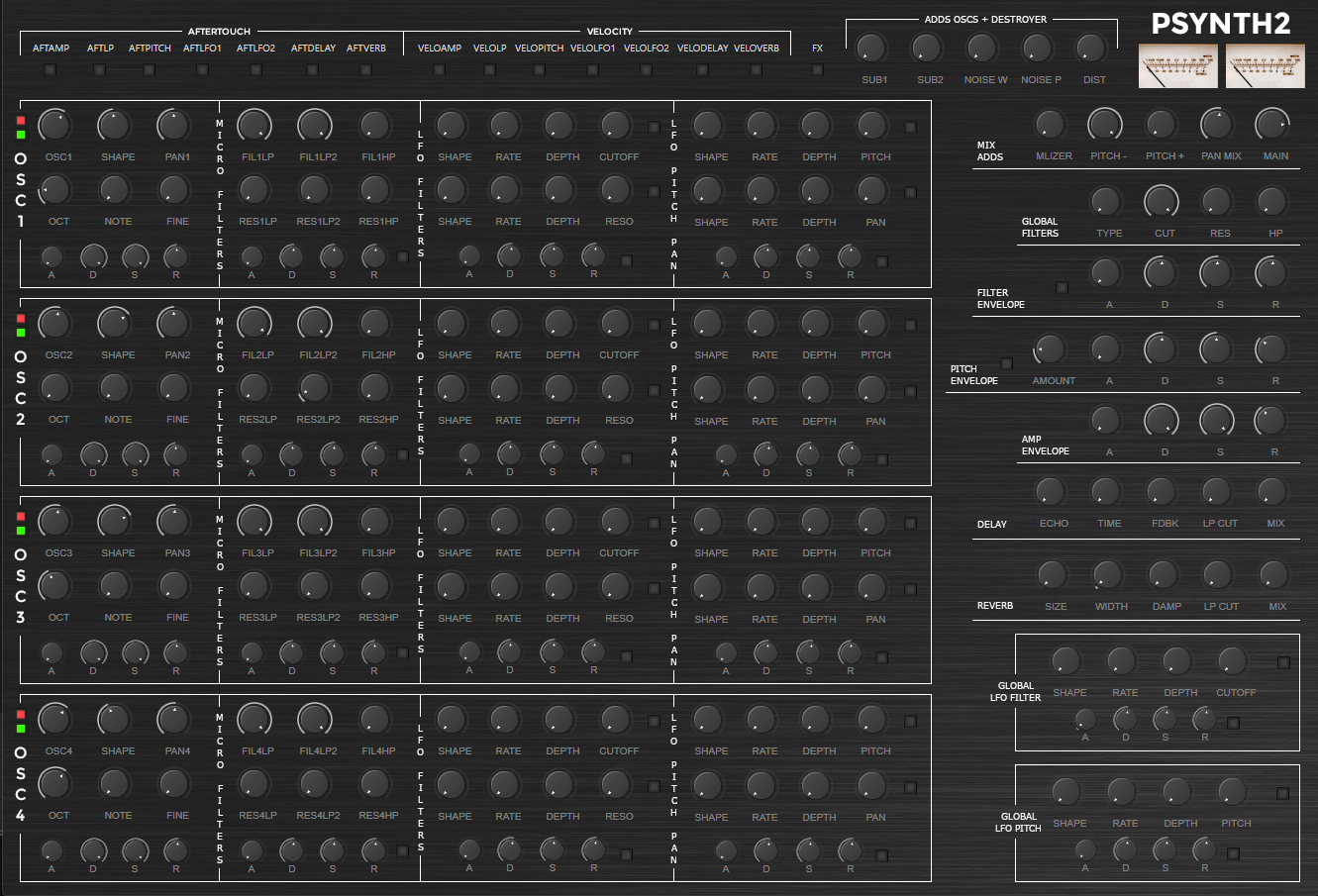
The expanded instrumentPSynth2 instrument interface with four oscillator sections, global filters and effectsPSYNTH / 02
Free download

PSynth2

Play chords and layer textures

Give one oscillator a quick attack and let another fade in behind it. Pan the layers apart and filter them separately for a bright attack and a soft tail.

Version
2.45
Released
11 March 2026
Platforms
Windows · macOS

PSynth2 manual (PDF, EN) ↓Installation guide ↗Explore the sound Technical specificationsWatch & listen

Inside a PSynth2 patch

Contents

LFO PAN

Let one layer drift

Keep a chord centred while a single oscillator drifts slowly between the speakers.

Try these settings

Leave PAN1 near the centre, enable its PAN LFO and select Sine with SHAPE and set a low RATE. Move DEPTH away from centre and raise PAN to widen the movement.
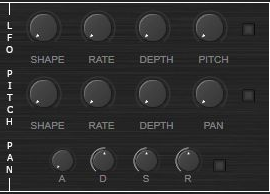
Let one layer drift

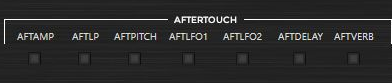
AFTERTOUCH

Echo on the last note

Give the final note of a phrase an echo by pressing into the key after the attack.

Try these settings

On a keyboard with aftertouch, enable AFTDELAY for echoes or AFTVERB for a reverb tail. Hold the note and vary the pressure to shape the send.

Echo on the last note

GLB FILTERS

Sweep above the sub

Thin out the main oscillators while a steady sub holds the bass line. The sub and noise sources bypass the global filters.

Try these settings

Add a little SUB1 and choose Band Pass with TYPE. Hold a low note and sweep CUT to hear the upper layer move over the sine bass.

Sweep above the sub

DELAY

Dark echoes behind a bright pluck

Let a bright pluck cut through while its echoes recede behind the next note. The delay return has its own low-pass filter.

Try these settings

Start with low MIX and moderate FDBK. Set TIME by ear, then lower LP CUT in DELAY to soften the repeats.

Listen
Dark echoes behind a bright pluck

Watch & listen

Listen

First dry, then with stereo delay.

Technical specifications

Contents

Sound sources

Sound engines
1 × PSynth2
Main oscillators
4 × OSCSHAPE: Sine / Saw / Pulse / TriEach layer has its own waveform, tuning, level and stereo position.
Tuning and balance
OCT: −2 / −1 / 0 / +1 / +2 / +3NOTE: 0–11 stFINEON/OFFPAN1–PAN4
Sub oscillators and noise
SUB1: SineSUB2: PulseNOISE W: White NoiseNOISE P: Pink NoiseThe two subs and both noise sources bypass the local and global filters.

Filters and envelopes

Filters per oscillator
4 × (LP → LP2 → HP)LP: MoogLP2: SVFHPEach stage has its own cutoff and resonance.
Global filter
TYPE: Low Pass / High Pass / Band Pass / Band RejectCUT / RES → HPLow-pass removes highs, high-pass removes lows, band-pass isolates a band and band-reject cuts it.
Envelopes
4 × OSC ADSR4 × MICRO FILTERS ADSR → LP / LP2 / HPGLOBAL: AMP / FILTER / PITCH ADSRShape each oscillator’s level and brightness separately, then use the global envelopes for the whole sound.
PITCH ENVELOPE
ON/OFFAMOUNTPITCH + / PITCH −

Modulation

Per oscillator
4 × (LFO PITCH + LFO FILTERS CUTOFF + LFO FILTERS RESO + LFO PAN) = 16 LFODEPTH / RATE / SHAPEPITCH / CUTOFF / RESO / PANON/OFF
Global
2 × LFOGLOBAL LFO FILTER → TYPE / CUTGLOBAL LFO PITCH → PITCH
LFO waveforms
SineSawPulseTri
LFO · ADSR
CUTOFF: ADSR → LP / LP2 / HPPITCH + PAN: 1 × ADSR / OSCGLOBAL LFO FILTER: ADSRGLOBAL LFO PITCH: ADSR
LFO PAN
PAN1–PAN4 + LFO PANDEPTH: + / 0 / −

Playing and MIDI

Polyphony
12 voices by default.
VELOCITY / AFTERTOUCH
AMPLPPITCHLFO1LFO2DELAYVERB
LFO1 / LFO2
VELOLFO1 → GLOBAL LFO PITCH + FILTER: RATE / DEPTHAFTLFO1 → GLOBAL LFO PITCH: RATE / DEPTHVELOLFO2 / AFTLFO2 → GLOBAL PITCH + CUTOFF
MIDI
Pitch BendSustain (CC64)MIDI to CV Channel: All / 1–16Learn / UnLearn

Effects and output

DIST / MLIZER
2 × Soft DistortionShape / LimitTwo independent stereo distortion paths change the shape and limit of the saturation curve.
DELAY
TIME / FDBKECHO → Delay L/RLP CUTMIXMIX sets the send level. Velocity and aftertouch can add to it.
REVERB
Reverb DHSIZE / WIDTH / DAMPLP CUT / MIXBoth the direct mix and the delay feed the reverb.
MIX/ADDS
MAINPAN MIXFX

Presets and formats

Saving sounds
Save and recall sounds in your DAW. The panel has no dedicated preset browser.
VST3 · DAW
SUB2 → KnobMLIZER → MAINHIDDENFIL1LP2 → FIL2LPRES1HP → RES1LPGLOBAL LFO FILTER: RATE / DEPTH / SHAPE → GLOBALLFOCUTOFF
Instrument format
PSynth2 2.45VST3 • Windows x641 × MIDI INStereo L/R

Manual PDF · EN

PSynth3

PSynth3 interface

PSynth3 is downloadable software: a VST3 synthesizer and standalone application for Windows 64-bit. No physical product is shipped.

